Tattoo Maker: Design & Art
- 3.5
- Rating
- 500.00K
- Installs
- Free
- Price
 Analysis by App-foxy
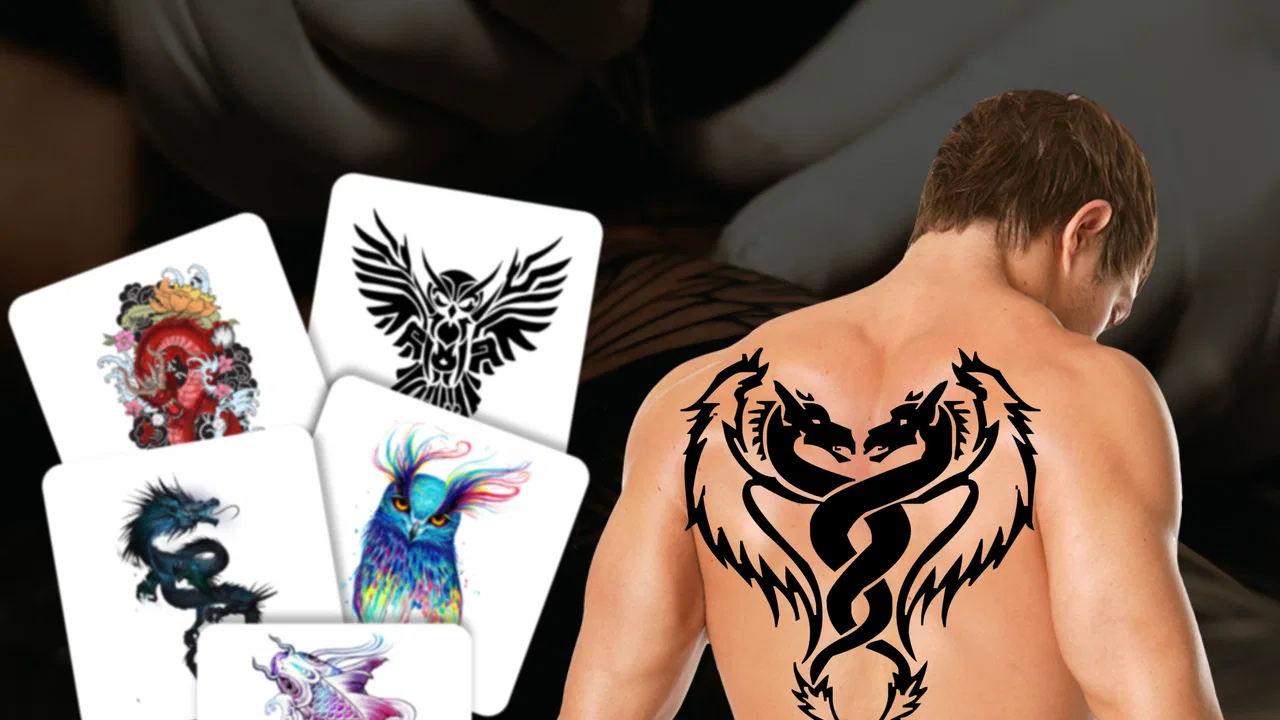
I tested Tattoo Maker: Design & Art as a simple beauty app built around one appealing idea: creating a tattoo concept and seeing how it might look on a body image before making any real commitment. That focus makes it more useful than a basic gallery of tattoo pictures, especially if you are still deciding between a few styles or want to explain an idea to a tattoo artist.
The app is free, suitable for Everyone, and comes from MegaMod Studio. It is listed in the beauty category, where its main value is visual planning rather than professional tattoo design. I would not treat the result as a finished stencil or a substitute for an artist’s advice, but I found the preview concept genuinely helpful for turning a vague idea into something easier to discuss.
Turning a vague tattoo idea into a body preview
The most important capability here is the ability to design a tattoo and preview it on a body image. That sounds straightforward, but it changes the decision process. Looking at an isolated tattoo drawing tells you whether you like the artwork. Placing it on a body image asks a more practical question: does the scale, position, and overall impression feel right?
You May Also Like

 Blood Strike: 2.5 Anniversary
Blood Strike’s Loadouts Turn Every Drop Into a Tactical Gamble
A close look at Blood Strike’s custom loadouts: how fast access to signature weapons reshapes its battle royale rhythm, rewards preparation, and narrows the gap between fights.

 Pandora - Music & Podcasts
Pandora’s Music Is Easy to Start, but Harder to Recover
Pandora’s strength is its low-effort path from a seed to a station. Its weak spot is how much confidence it asks you to place in connection, setup, and quiet recovery.

 8 Ball Pool
 Is Built on Rivalries, Rematches, and Routine
A close look at the rivalries, rematches, shared routines, and unanswered safety questions that turn a quick pool match into a persistent mobile community.

 Samsung Music
’s Quiet Strength Is Playing What You Already Own
Its reach comes less from spectacle than from dependable access to a personal library. That simplicity is both the app’s strongest retention engine and its ceiling.

 AccuWeather: Weather Radar
AccuWeather Review: A Quick, Clear Forecast for Everyday Decisions
For everyday plans, the best forecast is the one you can understand quickly. AccuWeather makes rain timing, radar, and local conditions easy to act on, with a few trade-offs.

 Hill Climb Racing
Why Hill Climb Racing Still Turns Crashes Into One More Run
A tiny car, a bumpy hill and one more upgrade: Hill Climb Racing keeps resurfacing because its simple chaos makes every near-miss feel personal.
More From Our News Desk



That distinction matters because a design that looks excellent on a white screen can feel too heavy on an arm, too small on a shoulder, or awkward when placed near an existing tattoo. A preview cannot reproduce real skin perfectly, but it gives me a more useful starting point than saving random inspiration images and trying to imagine the result.
I especially like this approach for people who are not yet comfortable with tattoo vocabulary. Instead of trying to describe a placement with technical terms, you can work from a visible example. Showing a rough preview to an artist can make the first conversation less abstract, while still leaving room for the artist to improve the composition, line weight, and fit.
The preview is best used as a conversation tool, not a promise of the final tattoo. Skin texture, body movement, lighting, ink saturation, and an artist’s interpretation will all affect the finished piece. Keeping that limitation in mind prevents the app from creating unrealistic expectations.
What the visual preview changes
In practice, the body image makes size and placement easier to judge. I can compare a design that feels discreet with one that immediately becomes the focal point. That is useful when choosing between a small personal symbol and a larger statement piece, or when considering whether a design will sit comfortably beside clothing, jewelry, or another tattoo.
It also helps with emotional distance. A tattoo idea can feel exciting when it exists only in your imagination, but seeing it on a body image gives you a moment to pause. I recommend leaving a saved concept alone for a while and returning to it later. If the design still feels right after that pause, it is a stronger candidate for a real consultation.
Another practical benefit is comparison. Rather than repeatedly imagining different options, I can create a few visual directions and decide which one communicates the intended mood. For example, a delicate design may suit a different position than a bold graphic, even if both are based on the same subject. The preview encourages that kind of side-by-side thinking.
How I would use it in practice
I would begin with a clear idea of the subject, mood, and approximate placement. The app is more useful when I already know whether I am exploring a symbol, lettering concept, decorative artwork, or something more personal. Starting with no direction can turn the process into endless browsing, so I prefer to define one question first: am I choosing the artwork, the location, or the size?
Once I have a concept, I would make one restrained version before experimenting. A common mistake is to keep adding visual elements because the screen makes changes feel effortless. For a tattoo, simplicity often survives the passage of time better than a crowded arrangement. I use the first preview to understand the basic balance, then make only one meaningful change at a time.
That one-change workflow is a useful habit with this app. If I alter the artwork, scale, and placement simultaneously, I cannot tell which adjustment improved the result. Testing those choices separately makes the preview more informative and reduces the chance of settling for a design that looks busy only because several changes were made at once.
I would also check the design at a normal viewing size rather than judging it only when it fills the phone screen. A tattoo is usually seen from different distances, and fine details that look impressive when enlarged may disappear in a smaller preview. This is one of the most important trade-offs: the app helps with composition, but the phone display can make details appear more precise than they will be on skin.
For a realistic everyday scenario, imagine that I am meeting a tattoo artist after work with three ideas for a forearm piece. Instead of bringing a folder of unrelated screenshots, I could use the app to show the general artwork on a body image, explain which version feels too large, and point out the placement I prefer. The artist would still redraw and adapt the concept, but the appointment could begin with a clearer brief.
A more careful workflow for first-time users
If this is your first tattoo, I suggest creating two versions of the same idea: one close to the size you initially want and another slightly more conservative. The comparison can reveal whether the design depends on being large to remain readable. If the smaller version loses its identity, that is valuable information to bring to the artist.
For lettering, I would be particularly cautious. A preview can show the general footprint, but it cannot settle questions about font durability, spacing, or how text will change as skin ages. Use the app to compare the overall shape and placement, then ask a professional to check spelling, letter spacing, and suitability for the chosen body area.
For symmetrical designs, I would create a version that considers the body’s natural direction rather than treating the preview as a flat canvas. A symbol may look centered on the screen but feel tilted when the arm or leg is relaxed. This is a subtle reason to use the preview as an early planning aid rather than a final measurement.
I would also avoid making a decision based on a single body image. Different poses and proportions can change the impression of the same artwork. If the app’s available preview does not resemble your body closely enough, the result should be treated as a rough visual reference. That does not make it useless; it simply limits how confidently you can judge exact placement.
Where the app is most useful
The strongest scenario is early-stage planning. If you have an idea but cannot picture it on the body, Tattoo Maker gives you a concrete way to explore it. It is also helpful when you want to communicate with a friend before booking a consultation, or when you are deciding whether a design should be visible, discreet, centered, or offset.
I see particular value for people who are collecting inspiration but want to move beyond saving images. Inspiration boards can show style, yet they rarely answer how one specific concept feels in one specific location. The body preview brings those two parts together, even if only approximately.
It can also help someone who is considering a first tattoo and feels nervous about the permanence. The app does not remove that decision, but it creates a low-pressure stage where you can notice doubts. If the preview repeatedly feels wrong, you can revise the idea without spending money or making an irreversible choice.
Another good use is preparing a more focused artist consultation. I would not expect an artist to copy an app-generated design exactly. Instead, I would bring the concept as a visual starting point and explain what I like: perhaps the size, the direction, the amount of empty space, or the relationship between the design and the body area.
That makes the app more valuable for communication than for artistic originality. Someone with strong drawing skills may prefer a professional illustration app, while someone who struggles to sketch a concept may get much more from a quick visual mock-up. The right audience is not necessarily experienced designers; it is people who need help making an idea visible.
Trade-offs compared with other approaches
Compared with searching images through a browser or social platform, this app offers a more direct path from inspiration to placement. Search tools are better for discovering artists, styles, and references from the wider tattoo community, but they can leave you with a collection of images that do not answer how your own idea will look on a body. Tattoo Maker narrows the task to personal visualization.
Compared with professional design software, it is likely to feel more approachable for casual planning. A dedicated illustration tool gives you finer control over layers, curves, typography, and export preparation, but that extra control also brings a steeper learning curve. If your goal is a quick tattoo mock-up rather than a polished artwork file, a simpler app can be the more sensible choice.
The trade-off is precision. A professional artist will understand anatomy, skin movement, line aging, and the technical limits of tattooing in ways a preview cannot. I would never use the app to decide whether a tiny detail will remain readable or whether a particular placement is medically and technically appropriate. Those questions belong in a consultation.
The app’s average rating is 3.3 from around 454 ratings, while it has passed 100K installs. I read that combination as a sign that the concept attracts real interest but may not satisfy every user equally. For me, that fits the experience: the central preview idea is useful, but expectations become a problem when someone wants a complete professional design studio rather than a planning aid.
The current version is 1.0.7, and the app was released on June 6, 2024. I would keep the version in mind when judging its scope. A focused early tool can be perfectly adequate for visual experimentation, but users seeking a mature production workflow may prefer an established design application with deeper controls and a longer history.
Small limitations that affect the decision
The biggest limitation is the gap between a flat preview and real skin. A phone image cannot fully show how a tattoo wraps around a curved area, changes with movement, or interacts with natural body contours. This matters most for large pieces, designs that cross joints, and artwork whose meaning depends on orientation.
There is also a risk of overvaluing appearance over longevity. The app makes the immediate visual result easy to judge, but it does not replace research into the artist’s style, hygiene standards, portfolio, or aftercare guidance. I would use the preview to choose a direction, then move the important decisions to a qualified professional.
People who want advanced editing may feel constrained. If you need detailed vector construction, exact print dimensions, complex layering, or a presentation-ready file, a specialist design tool will be a better fit. Likewise, if you are mainly looking for tattoo inspiration rather than creating a personal mock-up, a curated image platform may offer more variety.
Because it is free, I would also approach it with the normal patience I use for no-cost creative apps. The absence of a purchase price makes experimentation easy, but it does not guarantee the depth or refinement of a paid professional tool. I would judge it by whether it helps answer my immediate planning question, not by expecting it to replace an entire tattoo workflow.
Who gains the most from Tattoo Maker
I think the best audience is someone who already has a rough tattoo idea but cannot picture its scale or placement. First-time tattoo clients, people comparing several locations, and users preparing for an artist consultation can all gain something practical from the body preview.
It is also a good fit for friends planning matching or related tattoos. Each person can explore how the idea feels on a body image before turning a shared concept into a permanent decision. The app does not settle whether the designs should be identical, but it can make differences in size and visibility easier to discuss.
Creative users may enjoy it as a low-pressure sketching stage. I would use it to test whether an idea has enough visual clarity before spending time on a more detailed drawing. That is a useful filter: if the concept only works after heavy explanation, it may need simplification before it becomes a tattoo.
I would recommend skipping it if you expect a finished stencil, guaranteed realism, or technical advice about tattooing. It is also not the right first choice for an artist who needs precise production files. In those cases, professional software and direct collaboration with a tattooist will provide more reliable results.
My overall view is favorable but deliberately limited. This beauty app does one job well enough to be worthwhile: it helps me see a tattoo idea in relation to a body image instead of leaving the decision entirely to imagination. Its value comes from the pause it creates between inspiration and commitment.
For a free app that supports Everyone and runs on Android 7.0 or later, that is a useful role. I would install it before a consultation, create a few restrained variations, and use the previews to clarify what I actually want. I would not let the screen make the final decision, though. The strongest result comes when the app starts the conversation and a skilled tattoo artist finishes the thinking.
FAQs for Tattoo Maker: Design & Art
01What features does Tattoo Maker: Design & Art offer to users?
Tattoo Maker: Design & Art provides a wide range of features, including a comprehensive library of tattoo designs, customizable color palettes, and advanced drawing tools. Users can experiment with various styles, save their creations, and even simulate tattoos on their own photos to visualize the final result. The app also supports sharing designs on social media platforms.
02Is Tattoo Maker: Design & Art suitable for professional tattoo artists?
Yes, Tattoo Maker: Design & Art caters to both amateurs and professionals. It offers advanced tools for detailed design work, allowing professionals to sketch out ideas and refine them on the go. The app’s high-resolution output ensures that designs can be used as precise templates for actual tattoo work.
03Does Tattoo Maker: Design & Art require an internet connection to function?
While Tattoo Maker: Design & Art offers offline capabilities for designing and saving work, certain features like accessing new design packs and sharing creations online do require an internet connection. Regular updates also need an internet connection to download the latest features and design kits.
04Are there any in-app purchases in Tattoo Maker: Design & Art?
Tattoo Maker: Design & Art is free to download, but it offers in-app purchases. These include premium design packs, additional color palettes, and advanced tool enhancements. While the basic version is quite functional, purchasing these add-ons can significantly enhance the creative experience.
05How user-friendly is Tattoo Maker: Design & Art for beginners?
Tattoo Maker: Design & Art is designed with an intuitive interface that makes it easy for beginners to navigate. The app includes tutorials and guided steps to help new users get accustomed to the tools and features. With practice, even those new to tattoo design can create impressive works of art.
Pros
- User-friendly interface for easy design
- Wide variety of tattoo styles available
- Customizable color palettes
- High-resolution design export
- Offline mode for on-the-go creativity
Cons
- Limited free design templates
- Occasional app crashes reported
- In-app purchases can be costly
- No social media sharing integration
- Requires a lot of storage space

Tattoo Maker: Design & Art
Gallery